
This guide is designed to help you find owner of email address Gmail, using various techniques such as reverse email lookup tools and online search methods.
Finding the owner of an email address in Gmail can be challenging, as Gmail prioritizes user privacy. However, you can try sending an email to the address and politely ask for the person's identity. If that doesn't work, you can utilize email lookup tools and search engines to see if the email address is associated with any public profiles or websites.
If you want to know how to find out who a Gmail account belongs to, continue reading this page.
How Do I Find Out Who Owns a Gmail Address?
Various ways are available to find owner of email address Gmail, which are mentioned below from A to Z.
1. Google Search
A simple and straightforward method to find the owner of an email address is by using Google search. Just enter the email address into the search bar and check for any results that pop up.
You might uncover the individual’s name, cell phone number, job title, company name, social media accounts, location, or additional details that assist you in figuring out who they are.

This uncomplicated approach can provide valuable information about the person linked to the email address you’re searching.
2. The Sender’s Name May be in the Email Address
You may find who an email belongs to by checking the email address itself. Sometimes, the sender’s name is part of the email address.
For instance, if you get an email from mary.adam@gmail.com, the person’s name is likely Mary Adam. Similarly, if the email is from Johnbrown1985@gmail.com, the owner might be named John Adam.
But remember, not all email addresses include the sender’s name.
3. Reverse Email Lookup Tools
You can also try using a reverse email lookup service to find who owns an email. These tools help you find information about the owner of an email address.
Email finder tools are designed to find someone’s email or the emails associated with companies or organizations by inputting related details.
On the other hand, reverse email lookup tools aim to provide information about the owner of a known email address, including their name, address, and additional contact details.
This service is often employed to verify the legitimacy of emails, investigate unknown contacts, or gain more insights into individuals associated with particular email addresses.
The list of top reverse email lookup tools is mentioned below:
CUFinder
One of the best bulk email reverse lookup tools in the market is CUFinder. CUFinder converts the company and personal emails to their names and data in bulk.
CUFinder has three services in this regard:
- Contact Email to Name Converter
- Contact Email to Contact LinkedIn Converter
- Company Email to Company Name Converter

The first one converts large quantities of individuals’ emails to their first and last names.

The latter converts individuals’ emails to their LinkedIn URLs in bulk.

And the third one converts companies’ emails to their names in bulk.

CUFinder has various prospecting tools for lead generation and over 27 data enrichment services for CRM enrichment, including domain finder, phone number finder, social media extractors, etc.
Reverse Contact
Reverse Contact is a tool created to convert email addresses to LinkedIn data. After searching for an email address, it shows the person’s name, location, company, phone number, and job title based on the LinkedIn account.

IPQualityScore
IPQualityScore’s OSINT has a reverse email lookup service that delves into comprehensive details, exposing identity and risk factors associated with a user. Utilize this tool for email search lookups to gain enhanced insights into online users and the quality of email addresses.

Spokeo
Spokeo is a reverse email search tool that empowers you to identify the owner of any email address, enabling you to uncover their identity and gain a comprehensive understanding of their online presence.

Spokeo scans millions of public records and databases; this swift and efficient tool offers data for reverse email lookup within seconds. It promptly informs you if matching records are found, presenting details like names, social profiles, and additional information.
InfoTracer
InfoTracer finds the owners of google account emails by searching the email addresses.

You can access someone’s identity using just their email address, including the owner’s name, address, phone number, social media URLs, and more.
How to Find the Owner of Email Address for Free?
To find the owner of an email address for free, one can leverage a combination of free online tools and the power of search engines. Conducting an email address search via platforms that index social media profiles or using an email service that offers lookup features might help.

In general, it’s about piecing together information from various sources to deduce the email address owner’s identity.
Can You Find the Name by Email Address?
Yes, though the experience of connecting an email to a name is not straightforward and might be tough, it requires sifting through public records.

Quick strategies include searching the email on Google within quotes, checking social media, and exploring professional email lookup services like CUFinder or RocketReach.
How Do I Find the Sender in Gmail?
The process of finding the sender in Gmail is centered around examining the email’s header information. Gmail provides tools that allow users to inspect the details of an email, which can include sender information, although the general identity of the sender might not always be fully disclosed. An in-depth analysis or use of external tools might further address the search for the sender’s identity.
How to Find an Owner of a Gmail Account Free?

Here’s how to find the owner of a Gmail account for free:
- Start by searching the email address in Google within quotation marks to locate any public mentions.
- Explore social media platforms such as Instagram, X/Twitter, and LinkedIn, where the email might be linked to a profile.
- Additionally, utilize free email lookup tools and services that may provide insights into the associated name or details.
These methods, while not always conclusive, offer a starting point for identifying an email account’s owner without cost.
How Can I Trace the Owner of an Email Address?
Tracing the owner of an email address is a process that often involves using specialized tools designed for email searches. The general strategy includes utilizing services that can scan social networks, online profiles, and public records to find matches linked to the email address. This approach might not always yield direct results but can provide valuable leads.
How to Check Gmail ID Details?
To check your Gmail ID details, update your Google apps and follow these steps on an Android device:
- Open the Gmail app,
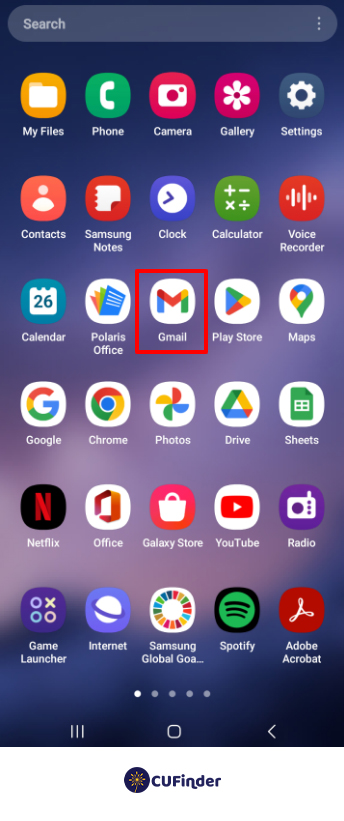
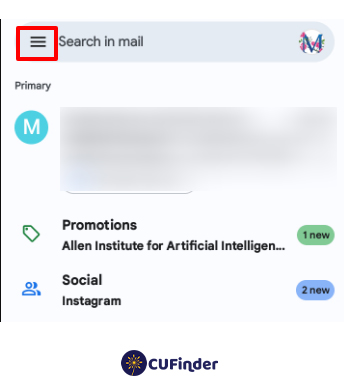
- access the menu from the inbox, and
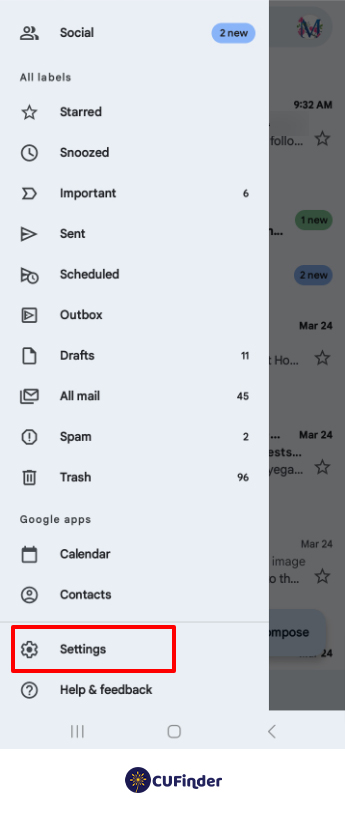
- click ‘Settings’ to see your account address under ‘General settings.’ Your username is the part before the “@” symbol.
To check someone’s Gmail contact details in an email, go to your inbox, open an email from the person of interest, and click their profile picture or username in the drop-down menu.
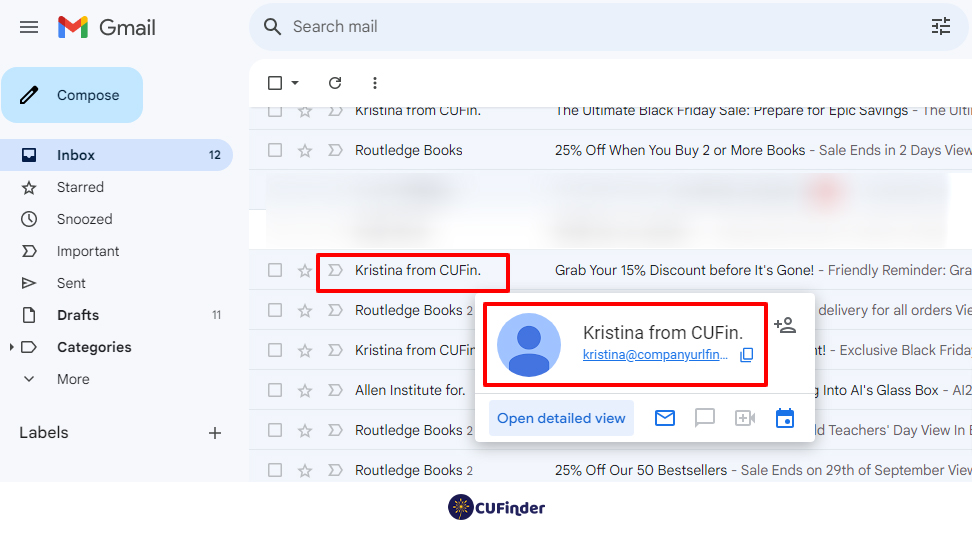
To check someone’s Gmail contact details while composing an email, click the Compose icon, enter their email address, select it from suggestions, and click their profile picture or username in the new menu.
Can You Find Out Who Owns Email Address Gmail?
Discovering the owner of a Gmail address can be challenging but feasible through reverse email lookups like CUFinder, social media profile exploration, the Google search engine, or the Whois search tool. Although privacy settings may limit the availability of this information, however, this offers avenues to potentially uncover the identity behind the email.
Email Owner Name
Finding an email owner’s name can be a challenging task, as it involves navigating through privacy protections and limited information. Utilizing an email service that specializes in address searches or exploring linked social media accounts can sometimes reveal the name of the email address owner.
Find Gmail Account Name
To find a Gmail account name, one often needs to employ strategies that go beyond a basic search. This might involve using specialized tools that analyze email metadata or platforms where the person might have linked their Gmail address. The goal is to address the search by collecting and correlating data from various sources.
Email Tracer
An email tracer is a tool or service designed to map an email address back to its owner. The experience of using an email tracer varies, as some tools provide general information based on public records and online activity, while others offer more detailed insights into the email’s origins and the owner’s digital footprint.
Converting Email to Names: Why?!
Converting someone’s email to their name, often through reverse email lookup, can have various practical uses:
Contact Information Verification:
Confirming the owner’s name linked to an email address helps verify the accuracy of contact information, ensuring you’re reaching out to the intended person.
Personalization:
Knowing a person’s name associated with their email allows for personalized communication. Addressing individuals by their names in emails is more respectful and engaging.
Security Measures:
Verifying the owner’s name can be part of security protocols, helping to prevent fraudulent activities or unauthorized access to accounts.
Professional Networking:
In a professional context, converting an email to a name can assist networking efforts. It provides a more direct and personalized approach when reaching out to professionals.
Marketing and Outreach:
For marketing purposes, understanding the person behind an email address enables targeted and customized outreach, tailoring messages to specific individuals.
Customer Relationship Management (CRM):
In business, linking an email to a name is valuable for maintaining accurate records in CRM systems and aiding customer relationship management.
Research and Investigation:
In certain situations, converting an email to a name can be helpful for research or investigative purposes, helping to gather more information about an individual.
It’s important to note that while these uses can be beneficial, privacy concerns and ethical considerations should always be considered when obtaining and using personal information. Respecting individuals’ privacy and adhering to relevant regulations is crucial in these processes.
Conclusion
Various ways are available to find owner of email address Gmail, such as searching Google or other search engines or finding the person’s name in the reverse email lookup tools, etc.
These methods provide valuable insights into the person behind the email address. However, it’s essential to acknowledge that not every approach is guaranteed. Choosing a reliable reverse email lookup tool like CUFinder is crucial to converting any email address to its owner’s name or LinkedIn URL.
We recommend you find owner of email address Gmail by CUFinder through a free trial to assess the quality and accuracy of its data.
FAQ
Can You Find the Owner of a Gmail Account?
Finding the owner of a Gmail account often involves a nuanced experience. By leveraging search engines like Google or social media platforms like LinkedIn or Facebook with the email address, you can potentially uncover the identity of the Gmail account owner.
Can You Trace a Gmail Account?
Yes, it’s possible through the sender’s IP address, but such information is accessible only to authorized parties like law enforcement or Google’s security personnel, ensuring personal details remain confidential.